Game Mode Variants
There are times when you will want to create two (or more) almost identical game modes, with slight differences on some keys that only apply to certain game regions and/or certain organizers. A classic example: include/hide certain game maps in certain regions.
So instead of cloning (possibly multiple times) the entire game mode, and applying the required changes on the keys of the cloned game mode(s), you may create a game mode variant on the fly by toggling the Customize key with Variants for regions and/or organizers switch in the key’s edit pane.
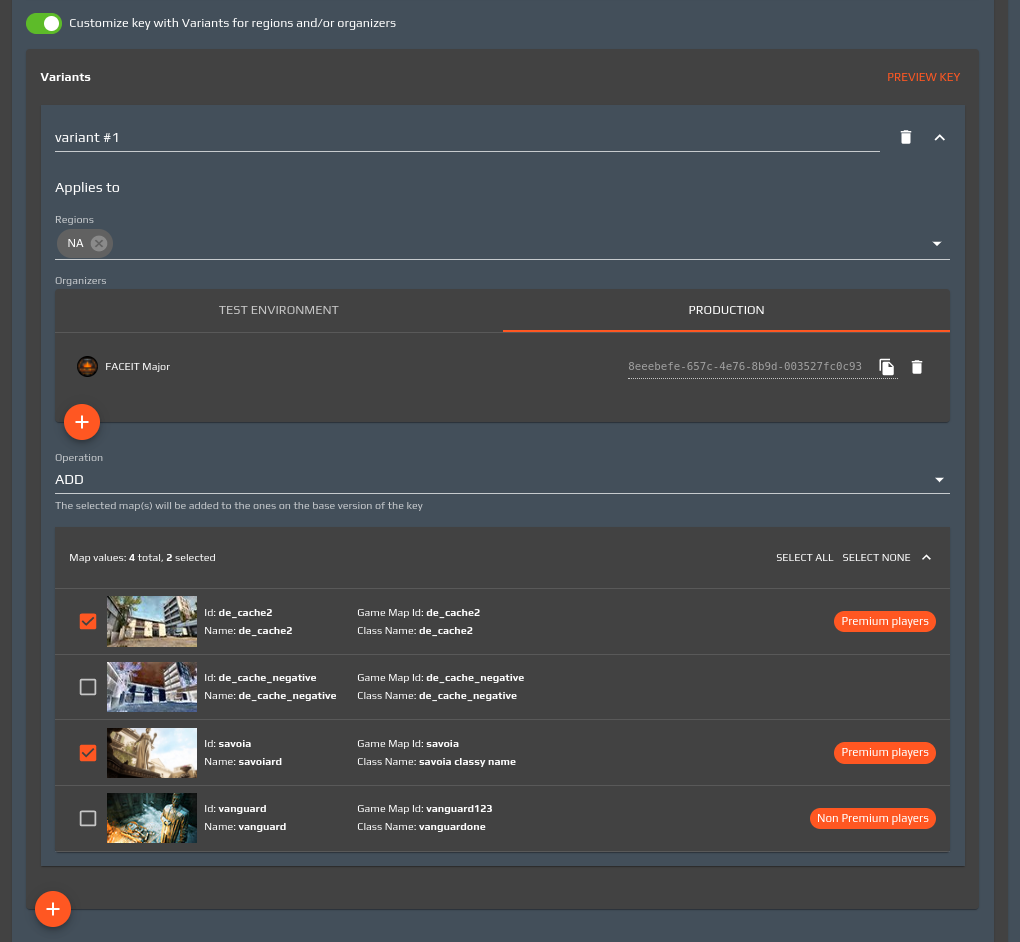
Once enabled you can create one or more variants for the key; each variant is defined by a name, a set of regions and/or organizers it applies to (the latter need to be specified on a per-environment basis), a set of values that defines the variant and an operation (REPLACE/ADD/REMOVE) which describes how the chosen values interact with those selected in the “base version” of the key (i.e. the values that apply to the base game mode, regardless of the region and the organizers using it). For example, in the above screenshot, the variant named “variant #1” simply adds the selected maps to the base version of the game mode, but only applies to the “FACEIT Major” organizer in the NA region. Another common usage consists of selecting all possible key values in the base version, and only opt to remove a certain map in the variant; finally, one can create a variant whose chosen values entirely replace those on the base version. An advantage of using the game mode variants approach over creating copies (clones) of the game mode is that whenever you need to make a new version of the base game mode (for instance, to include a new match custom data key), all the variants will be updated accordingly, without the need to create new versions of each. Think of the variant as a lightweight game mode which only specifies the differences with regards to the game mode it branches from.